 3Guide Docs
Platform Playbooks
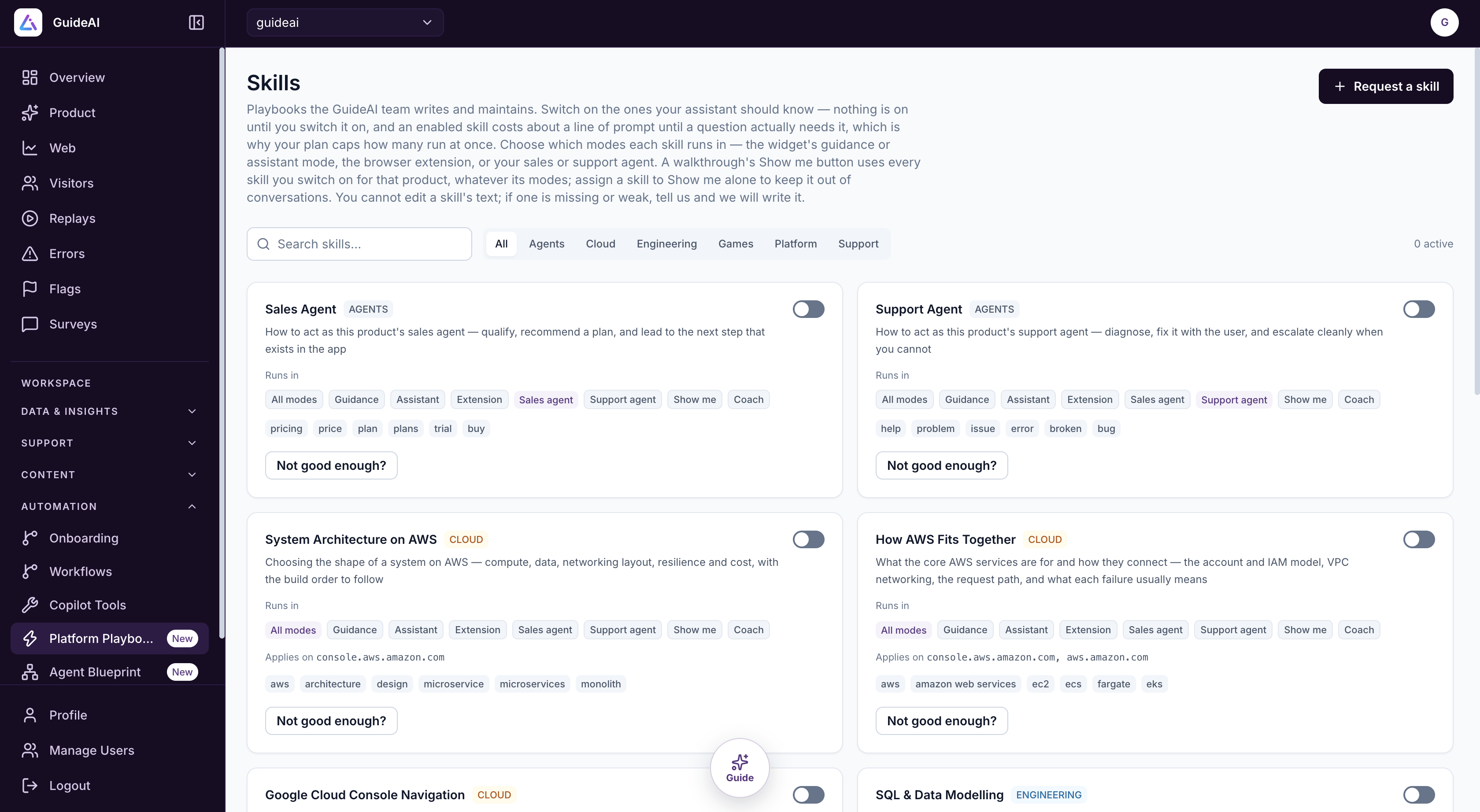
Ready-made playbooks that tell your agent how to behave and what to know on your site. Switch them on, choose where they run, and request new ones.
A playbook tells your agent how to act, or what it needs to know, on your website. The 3Guide team writes and maintains them, so you get an expert agent without writing prompts.
Some playbooks give the agent a role:
- Sales Agent: qualify the visitor, recommend a plan and lead them to the next step in your app
- Support Agent: diagnose the problem, fix it with the user and escalate cleanly when it can't
Others give it know-how about a product or field, such as System Architecture on AWS or Google Cloud Console Navigation. They're grouped as Agents, Cloud, Engineering, Games, Platform and Support.
Why it matters: your agent behaves like a trained salesperson, support rep or specialist from day one. Playbooks are kept up to date for you, and a playbook that's switched on adds almost nothing to each conversation until a question actually needs it.
Open them from Automation → Platform Playbooks.
Use a playbook
Switch it on
Nothing is on until you switch it on. Search or filter by category, and use the switch on the card. Your plan sets how many can be on at once, and the count is shown at the top right.
Choose where it runs
Under Runs in, pick the modes that use it:
| Mode | Where |
|---|---|
| All modes | Everywhere |
| Guidance / Assistant | The chat widget's two modes |
| Extension | The browser extension |
| Sales agent / Support agent | Those agents in Agent Blueprint |
| Show me | The Show me button on a walkthrough |
| Coach | The Guidance coach |
The Show me button uses every playbook you've switched on for that product, whatever its modes. To keep a playbook out of conversations, assign it to Show me only.
Check when it's used
Each card lists keywords (for example pricing, plan, trial for Sales Agent) that bring the playbook into a conversation. Some apply only on certain sites, shown as Applies on, for example console.aws.amazon.com.
Need something different?
You can't edit a playbook's text, but you can ask for changes:
- Not good enough? on a card tells the 3Guide team that playbook needs improving.
- Request a skill at the top of the page asks for a new playbook. Describe what the agent should do.
- In Agent Blueprint, a Requested behaviour block does the same from inside your flow.
A person on the 3Guide team writes each requested playbook.